
Which Table Saws Accept Dado Blades? Arbor, Throat Plate & Limits
INFO
Evidence Level: Document Review with Model-Specific Verification
A dado blade for table saw use requires the manufacturer to allow dado operations and the saw to have enough arbor length, throat plate clearance, and safety configurations to support a wide stack. Blade diameter alone does not determine compatibility. Many full-size 10-inch table saws easily handle 6-inch or 8-inch dado stacks, while compact and 8-1/4-inch jobsite saws often cannot. Always check the saw manual before installing a dado blade for table saw use.
| Saw Category | Typical Dado Support | Notes |
|---|---|---|
| Cabinet saw | Usually Yes | Check maximum stack width (often up to 13/16” or 29/32”) |
| Contractor saw | Usually Yes | Often supports 8-inch stacks |
| 10-inch jobsite saw | Model dependent | Manual required; varies heavily by brand |
| 8-1/4-inch portable saw | Model dependent | Often prohibited or limited to a narrow stack; manual verification required |
What Makes a Table Saw Dado-Compatible?
Not all table saws are engineered to spin a heavy stack of blades. A dado set requires the machine to have specific physical clearances and structural tolerances.
If a saw is not built for a dado stack, forcing one onto the machine creates severe safety risks. The primary determining factors are the length of the arbor shaft, the clearance inside the table casting, and the trunnion assembly’s ability to clear the wider cutting profile.
How to Check Whether Your Saw Accepts a Dado Stack
Before investing in a dedicated cutter set, verify compatibility with your exact saw model. Do not rely on brand reputation alone, as manufacturers vary the specs between different models in their own lineups.
Dado Compatibility Checklist:
- Manual explicitly permits dado cuts: Look for a section titled “Non-Through Cuts” or “Dado Operations.”
- Maximum width is listed: The manual should specify a maximum stack width (e.g., 13/16-inch).
- Arbor length is sufficient: The arbor must allow the nut to fully thread on when the stack is installed.
- Model-specific dado throat plate available: The manufacturer or a reputable aftermarket supplier must offer an insert designed and properly fitted for that exact saw model.
- Arbor diameter matches: Ensure your saw’s arbor (usually 5/8-inch in the US market) matches the dado stack bore.
- Riving knife instructions are included: The manual should explain how to set up or bypass the safety splitter system for non-through work.
Arbor Length Is the First Limitation
The most rigid physical constraint is the length of the saw’s arbor shaft.
A standard table saw blade—even a full kerf rather than a thin kerf blade—is only about 1/8-inch thick. A full dado stack can be up to 13/16-inch or 29/32-inch wide. To accommodate that extra width, the threaded portion of the arbor must be significantly longer than what is required for a single blade.
When you install a full-width stack, the arbor nut must fully engage the threads. If the nut only catches a thread or two, insufficient thread engagement increases the risk of the stack loosening during braking, particularly on saws equipped with electronic motor brakes. When a dado stack is installed, its added mass can increase coast-down and braking loads when the power shuts off. The manual for any dado-compatible saw will specify exactly how many threads must be exposed past the nut, or will state whether the outer arbor washer can be safely omitted to gain thread engagement.
Why the Throat Plate Matters
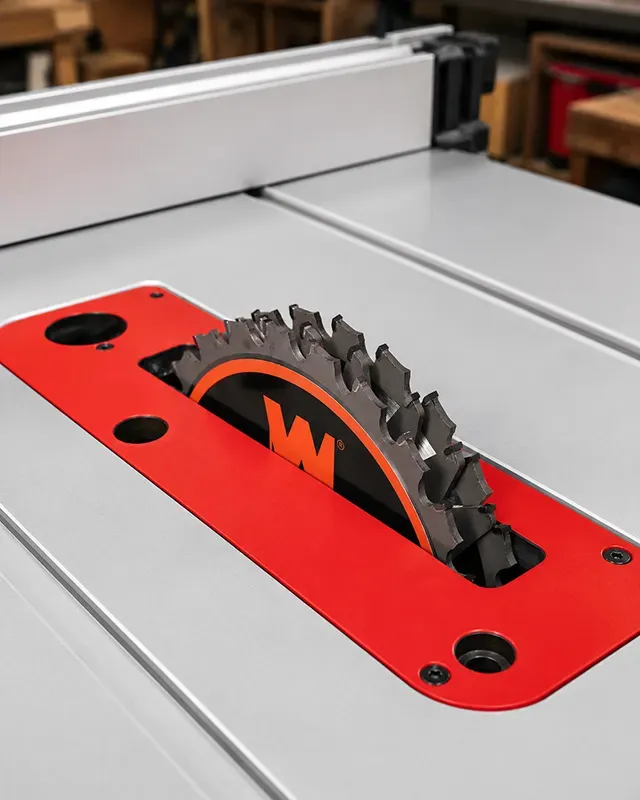
A factory table saw insert has a narrow slot designed for a single blade. To use a dado stack, you must replace it with a dedicated dado throat plate.
This requirement goes beyond simply fitting the wider blade. The throat plate must:
- Allow the stack to spin without hitting the sides of the insert.
- Provide rigid support to the workpiece right next to the cut to prevent tear-out.
- Prevent small offcuts from dropping into the cabinet and causing an internal jam.
Furthermore, the internal casting of the saw (the trunnion assembly) must be wide enough to allow the dado stack to spin and tilt without striking the metal housing beneath the table. If you look down into the throat of an ultra-compact saw, you will often see that the trunnion casting hugs the single blade closely to maximize dust collection and minimize footprint. These machines cannot physically clear a wide stack.
6-Inch vs 8-Inch Dado Stacks
Dado blades generally come in 6-inch and 8-inch diameters. You do not use a 10-inch dado stack on a 10-inch table saw.
An 8-inch dado stack is the standard choice for most 10-inch cabinet and contractor saws. It provides enough depth of cut for almost any furniture joint and easily handles deep tenon cheek cuts.
A 6-inch dado stack is often preferred for lighter jobsite saws. Because a dado cut removes a massive amount of material at once, it puts a heavy load on a 15-amp universal motor. The smaller 6-inch diameter has lower rotational inertia and less leverage against the motor, assuming similar arbor speed, which helps prevent the machine from bogging down or tripping an internal thermal overload breaker during a heavy cut.
However, a 6-inch dado stack does not make a non-compatible saw compatible. If the arbor is physically too short, a 6-inch stack is just as unsafe as an 8-inch stack.
Why Many 8-1/4-Inch Table Saws Do Not Accept Dado Blades
In recent years, the market has seen a distinct shift away from 10-inch portable saws toward compact 8-1/4-inch portable saws.
Many manufacturers shifted toward 8-1/4-inch portable saws to reduce weight, lower manufacturing costs, and improve transportability, while also meeting evolving safety certification requirements. To achieve these smaller footprints, the engineering traded away capacities. To reduce weight and footprint, manufacturers may shorten the arbor or reduce internal clearance. As a result, many 8-1/4-inch table saws prohibit dado blades or impose narrower width limits. However, some models provide dedicated dado inserts and limited dado capacity, so blade diameter alone is not a reliable compatibility test.
For instance, certain Skil 8-1/4-inch models like the TS6308 and TS6328 explicitly allow a stacked dado up to a maximum width of 5/8-inch, while the SKIL SPT99T-01 sets a limit of 1/2-inch.
Jobsite Table Saws vs Contractor and Cabinet Saws
When looking at the broader market, dado compatibility splits heavily by the size and class of the machine.
If you are comparing a jobsite vs contractor table saw, the contractor saw will almost always accept a dado stack. Full-size contractor saws and cabinet saws feature heavy cast-iron trunnions, long arbors, and induction motors designed to handle the high torque demands of spinning a heavy set of chippers.
Jobsite table saws are highly model-dependent. Many—but not all—premium 10-inch jobsite models support them. For example, the official manual for the DeWalt DWE7491RS explicitly allows up to a 13/16-inch maximum dado width using an 8-inch dado blade. Similarly, the Bosch 4100XC-10 supports stacked dado cutters up to the width specified in its manual, provided you install the Bosch TS1007 dado insert designed for the 4000 and 4100 series. Even some budget-friendly 10-inch models, like the Skil TS6307-00, offer specific manufacturer-approved accessories like the STA6307 dado insert, though they limit the maximum dado width to 5/8-inch.
Conversely, some ultra-compact models lack the arbor length or internal clearance required to safely mount a dado stack, or are simply not approved by the manufacturer.
Riving Knife, Blade Guard, and Non-Through Cut Limits
Dado cuts are fundamentally different from standard ripping because they are non-through cuts. The blade buries into the wood but does not emerge through the top face of the workpiece.
Because the cut does not go all the way through, the standard overarching blade guard and anti-kickback pawls must be removed. Furthermore, depending on the saw, the riving knife may need to be replaced with a low-profile riving knife or removed entirely so it sits completely below the apex of the dado blade.
Guard removal changes the saw’s kickback controls, so the workpiece must be guided with a method appropriate to the cut. Use a miter gauge or crosscut sled for cross-grain dados, and suitable push blocks or featherboards where the manual permits them. Never trap a crosscut workpiece between the miter gauge and rip fence unless a properly positioned clearance block is used. For more on why this matters, see our guide to table saw kickback mechanics.
How Wide Should a Dado Stack Be?
Most table saws that accept dado blades max out at a 13/16-inch or 29/32-inch stack. This is completely adequate for standard cabinetry, as it easily cuts a groove for nominal 3/4-inch plywood (which is typically undersized at 23/32-inch).
To determine the exact setup of chippers and shims required to match your material, calculating your dado stack width before mounting the blades saves you from repeatedly threading the heavy stack on and off the arbor.
Common Mistakes Before Buying a Dado Blade
- Assuming all 10-inch saws take them: Check your specific model number, not just the brand or blade size.
- Forgetting the insert: A dado stack is useless until you have the matching throat plate. These are almost never included with the saw and must be ordered separately.
- Ignoring the arbor diameter: Most table saws in the US have a 5/8-inch arbor. Ensure the dado stack you buy has a 5/8-inch bore, not a 1-inch bore meant for heavier industrial cabinet saws.
- Buying a “wobble” dado for a modern saw: Today, stacked dado sets are the more common choice because they provide flatter-bottomed grooves and broader compatibility with modern saws. Wobble dado cutters should be used only when the saw manufacturer explicitly permits them. For instance, brake-equipped systems like SawStop explicitly warn against using wobble blades due to the risk of interference with the brake cartridge mechanism.
Final Rule: Check the Manual Before Buying the Stack
The simplest way to confirm compatibility is to pull the manual for your exact saw model. Look in the index for “Dado” or “Non-Through Cuts.” If the manual provides instructions for installing a dado insert and lists a maximum dado width, the saw is compatible. If the manual states “Do not use dado blades on this saw,” trust the engineering and rely on a router for your joinery instead.
Manufacturer instructions always override general compatibility guidelines. If the owner’s manual prohibits dado blades, do not install them even if the arbor appears physically long enough.
Frequently Asked Questions
Can every 10-inch table saw use an 8-inch dado stack? No. While many full-size 10-inch cabinet and contractor saws accept 8-inch dado stacks, many 10-inch portable jobsite saws either restrict users to a 6-inch stack or limit the width to 5/8-inch due to arbor length limitations.
Why don’t many portable table saws accept dado blades? To make the saws lighter and more compact, manufacturers use shorter arbor shafts and narrower internal castings, leaving no physical room to mount a wide stack safely.
Can I install a dado blade without a dado throat plate? No. A dado stack will not fit through a standard table saw insert slot. You must use a model-specific dado throat plate to support the wood and clear the wide blades.
Is a 6-inch dado stack safer than an 8-inch one? On an underpowered jobsite saw, a 6-inch stack puts less strain on the motor because it has less rotational mass and a lower rim speed. However, it is not safe if the saw’s arbor is too short to fully engage the arbor nut threads.
Can I use a dado stack with a brake-equipped saw? Some brake-equipped saws, such as compatible SawStop models, support dado stacks but require a dedicated dado brake cartridge. Always verify compatibility in the owner’s manual (for instance, the portable SawStop CTS explicitly prohibits dado usage entirely).